

Digital Banking
Tropical Financial Digital Banking gives members convenient access to everyday account management from desktop or mobile. You can view balances, make transfers, manage scheduled payments, access Bill Pay, and connect with support through secure messages.
Zelle®1 is also available as part of the digital banking experience, giving members another fast way to send and receive money from people they trust.
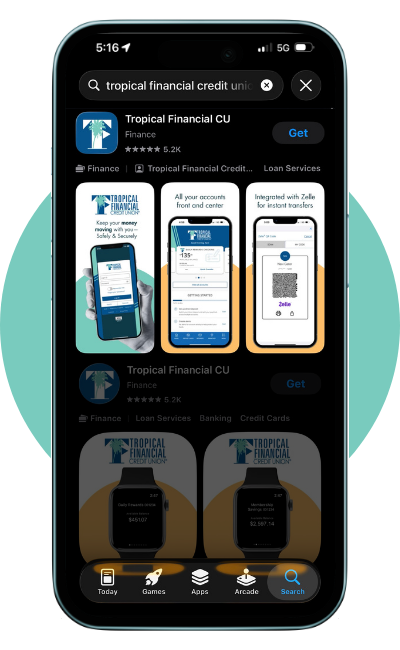
Download the TFCU app
Get easy access to your account with online and mobile banking. Download the TFCU Online and Mobile app from the Android & Apple stores. View balances, transfer funds, have access to Zelle®1, deposit checks 24/7 and more.
Search for "Tropical Financial CU" to find the app, or just scan one of the QR codes to download.


-png.png?width=200&height=60&name=Optimization%20Assets%20(2)-png.png)
-png.png?width=200&height=61&name=Optimization%20Assets%20(3)-png.png)
With TFCU's Digital Banking:
- Log in, view balances, and make real-time transfers between Tropical accounts.
- Set up and manage new scheduled transfers or payments.
- Access External Transfers, Bill Pay, Mortgage, and Credit Card accounts directly from one convenient place.
- Continue to enjoy automatic processing for pre-scheduled payments and transfers.
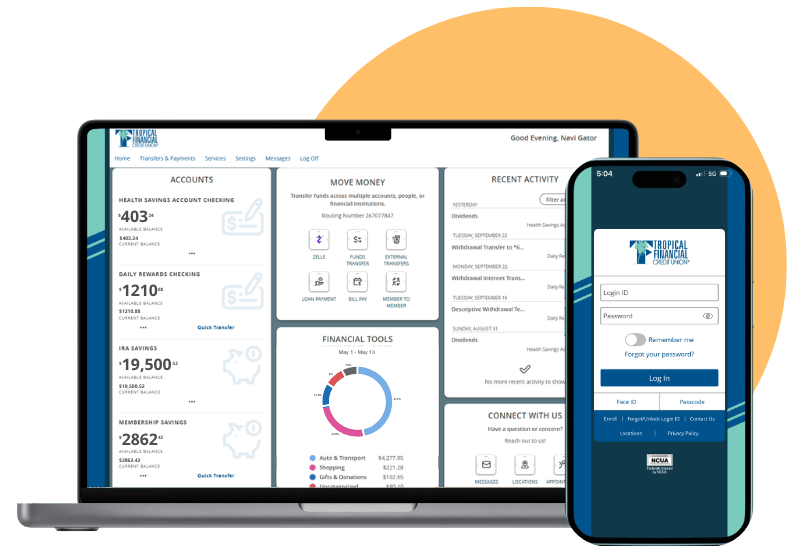
Features
This experience isn’t just about new tools. It’s about giving you a digital banking platform that’s faster, more flexible, and built to fit the way you live.

Zelle®1 is a fast, safe and easy way to send and receive money


Loan Payments
Stay on top of your TFCU loan with quick, secure payments right from Online or Mobile Banking.
Mobile Deposit
Deposit checks anytime, anywhere using the TFCU Mobile Banking app, no branch visit required.
Frequently Asked Questions
-
Frequently Asked Question
-
How do I login to Tropical Financial Digital Banking?
Go to Member Login and enter your username and password to access your accounts online.
-
What if I am logging in for the first time?
If you're using our website, click the Member Login button located in the top right corner. If you're using a mobile device, download the Tropical Financial Mobile Banking app from the Apple App Store or Google Play Store and select Enroll below the login button.
-
What can I do in Digital Banking?
You can view balances, review transactions, transfer money, pay bills, access eStatements, send secure messages, and manage eligible loan or credit card payments.
-
Can I transfer money between accounts?
Yes. Digital Banking includes internal transfers of funds between Tropical Financial accounts and as well as to and from your linked external accounts.
-
Does Tropical Financial Digital Banking include Zelle®?
Yes. Zelle®1 is available through Tropical Financial Digital Banking and allows you to quickly send and receive money with friends, family, and others you trust using their U.S. mobile number or email address. For your protection, only send money to people you know and trust.
-
How do I make a Tropical Financial loan payment online?
Log in to Digital Banking and select Transfer & Payments. Choose Pay Loan or Card from TFCU to make a payment from your Tropical Financial account, or select Loan Pay powered by SWIVEL to pay from another financial institution using ACH or a debit card. A convenience fee applies to one-time SWIVEL payments, while recurring payments are free.
-
Can I send a secure message for account help?
Yes. After logging in to Digital Banking through Online Banking or the mobile app, select the Messages tab to securely contact our Digital Banking team with questions about your account or Digital Banking services.
-
How do I get help with login or Digital Banking support?
Our Digital Banking team is available Monday through Friday from 8:00 a.m. to 6:00 p.m. You can reach us at
305-261-8328 (Miami-Dade), 888-261-8328 (outside Miami-Dade), or by email at DigitalBanking@tfcu-fl.org for assistance with enrollment, login issues, password resets, and other Digital Banking questions.
-
-
Auto Loans
-
Why should I get a credit union car loan?
Tropical Financial offers four different types of vehicle loans which include new, used, recreational and refinancing. There’s many benefits to a credit union car loan versus one from another financial institution. Credit Unions tend to offer lower rates and terms, personalized service, preapproved financing to streamline the car buying experience as well as perks and promotions for members.
-
What should I know about car loans from a credit union in Florida?
Many people decide to apply for an auto loan at the dealership and are unaware of the details for their loan. There’s many important pieces that consumers should be aware of, yet are not always notified.
-
How long are car loans usually for?
Our auto loan terms differ between new and used. New auto loans have the option of 36, 60, 72 or 84 months. Whereas, our used auto loan terms are generally for 36, 60 or 72 months.
-
How much will I pay overall on my car loan from a credit union?
This depends on your specific situation. However, the important thing to know about stretching out the term is that you’ll pay less monthly, but end up paying more over time due to interest, whereas with shorter terms you’ll pay a higher monthly payment and less over time.
-
What’s the interest rate on an auto loan from Tropical Financial Credit Union?
Our rates vary depending on the term you choose and also varies depending on credit score. We recommend working with one of our representatives to find your specific rate and payment based on your specific details.
Applying for a car loan from a credit union in Florida is an easy process. You can either apply online or call in to speak with a representative. We provide resources to members and non-members, so they can decide if applying with us, is the right choice for them.
We recommend browsing our different types of auto loans as they allow you to compare car loan rates, calculate/estimate future payments and apply for a pre-approval.
For more tips and tricks be sure to check out our auto blog here.
-
How To Remove My Online/Mobile Banking Account Access
To remove your Online/Mobile Banking access, send an email to DigitalBanking@tfcu-fl.org with the subject line “Remove Online/Mobile Banking Account” and include your full name and a good phone number where we can reach you. A representative will contact you to confirm the request and begin the removal process.
When your request is completed, Tropical Financial Credit Union will delete all data associated with your online and mobile banking access from its digital systems, and that data will no longer be available to any party. Your accounts will remain open, and your account transaction history will remain in Tropical Financial’s main system as long as your accounts stay active, but all Internet and Mobile Banking data will be removed.
If you have any questions about this process, call us at 305-261-8328 (Miami-Dade) or 888-261-8328 (all other areas).
Disclosures
1 To send or receive money with Zelle®, both parties must have an eligible checking or savings account. Transactions between enrolled users typically occur in minutes. Payment requests to persons not already enrolled with Zelle® must be sent to an email address. Data rates may apply. Check with your mobile phone carrier for details. App Store is a service mark of Apple Inc. Copyright © 2025 . All rights reserved. Zelle® and the Zelle® related marks are wholly owned by Early Warning Services, LLC and are used herein under license.